Blogs



newsroom
News & Updates
Recent Updates
Categories
How to Choose the Right Kiosk Form Factor
Published: February 26, 2026
How to Choose the Right Kiosk Form Factor
Choosing the right kiosk form factor is one of the most consequential decisions an operations or IT leader will make when deploying a self-service solution. Get it wrong, and you end up with hardware that disrupts foot traffic, frustrates users, or simply does not fit the physical space. Get it right, and the kiosk becomes a seamless extension of your service environment reducing staff dependency, accelerating throughput, and improving the overall visitor experience. Yet many organisations approach this decision by focusing almost entirely on software capability or unit cost, overlooking the physical and operational dimensions that ultimately determine whether a kiosk deployment succeeds or fails.
ATT™’s Kiosk Operation Solution (KOS) is built with exactly this challenge in mind, offering a modular range of form factors from full-height registration terminals to tabletop units and slim standees. Whether you manage a hospital, a government service centre, a financial branch, or a corporate facility, the physical format of your kiosk directly shapes how well it performs. This guide walks through the key considerations that should inform your selection, helping you match the right kiosk format to your operational environment, user profile, and long-term service goals.
Start with Your Physical Space and Deployment Environment
Before evaluating any kiosk specification, the space it will occupy must be assessed with precision. A full-height floor-standing terminal that works well in a spacious hospital atrium will create a bottleneck in a compact bank branch or clinic waiting room. Conversely, a tabletop unit placed in a high-footfall transit hub may go unnoticed entirely, rendering the investment ineffective before a single transaction takes place. Physical space analysis should account for floor area, ceiling height, pedestrian flow patterns, proximity to service counters, and whether the deployment is indoors or outdoors. Each of these variables directly influences which form factor will integrate naturally into the service journey rather than interrupting it.
ATT™’s KOS range is designed with spatial adaptability as a core principle, offering configurations that serve environments as varied as retail lobbies, secure government facilities, healthcare waiting areas, and transportation concourses. Mapping your deployment zone before selecting hardware avoids costly retrofits and ensures that the physical presence of the kiosk reinforces rather than complicates the flow of people through your space. Operations and facilities teams should treat this spatial audit as a non-negotiable first step, well ahead of any vendor conversations or hardware shortlisting. When the environment is understood thoroughly, the right form factor often becomes self-evident.
Indoor vs. Outdoor Placement Considerations
Indoor kiosks prioritise clean aesthetics, touchscreen responsiveness, and integration with ambient lighting conditions. The controlled environment means that standard commercial-grade displays and enclosures are typically sufficient, and the focus shifts to user interface quality and visual alignment with the surrounding space. In a corporate office or bank branch, for instance, a slim, well-finished standee integrates naturally into the reception environment and signals a professional, technology-forward service culture without dominating the space.
Outdoor deployments present a fundamentally different set of hardware requirements. Weatherproofing, anti-glare displays, and ruggedised enclosures capable of handling humidity, rain exposure, and temperature variation become essential particularly relevant across Southeast Asia’s climate conditions, where heat, moisture, and direct sunlight can rapidly degrade standard consumer or office-grade hardware. ATT™’s KOS configurations account for both indoor and outdoor scenarios, ensuring that hardware specifications are matched to the operating environment from day one. This approach reduces maintenance overhead, extends unit lifespan, and ensures that the kiosk continues to perform reliably regardless of external conditions.
Traffic Flow and Queue Proximity
Kiosk placement relative to existing queue lines and service counters significantly affects how efficiently visitors self-register or transact. A poorly positioned unit placed too close to an exit, tucked into a corner, or positioned in the path of natural foot traffic can create secondary congestion points that undermine the very efficiency gains the kiosk is meant to deliver. The physical location of the kiosk should guide users intuitively toward it at the right moment in their service journey, not after they have already joined a manual queue or reached the service counter.
Facilities management teams should map pedestrian flow data carefully, or gather it through the analytics capabilities within ATT™’s Q’SOFT® Enterprise Queue Management System (EQMS), to identify optimal placement zones that support smooth visitor movement and reduce dwell time at each touchpoint. When kiosk placement is informed by real operational data rather than assumptions, the result is a deployment that feels natural to users and delivers measurable improvements in throughput from the outset.
Match the Form Factor to Your User Demographics
A kiosk is only as effective as its accessibility to the people using it. User demographics including age range, digital literacy, mobility considerations, and language preferences must inform both the physical format and the interface design of the kiosk. A form factor that serves one user population exceptionally well may create significant barriers for another. This is not simply a matter of user experience preference; in many sectors, accessibility is a compliance requirement, and failing to account for it at the hardware selection stage creates costly retrofitting challenges later.
Healthcare environments serving elderly patients, for instance, require larger touchscreens, readable font sizes, and intuitive step-by-step prompts that minimise decision fatigue. Corporate or financial settings serving tech-savvy professionals may prioritise speed and minimal interaction steps over guided navigation. ATT™’s KOS is designed to be configurable at both the hardware and software levels, ensuring that the kiosk interface adapts to the end-user profile rather than expecting users to adapt to the technology. This user-centric approach aligns with ATT’s broader philosophy of delivering solutions that serve real people in real environments a philosophy that is as relevant to kiosk hardware selection as it is to the broader service design.
Accessibility Standards for Inclusive Self-Service
Kiosks deployed in public sector and healthcare environments must comply with accessibility guidelines, including appropriate screen height for wheelchair users, audio assistance options, and high-contrast display modes that accommodate users with visual impairments. These are not optional enhancements they are baseline requirements for any organisation that serves the general public and operates under equitable access obligations. Selecting a form factor without accounting for these standards at the outset will invariably result in remediation costs or, worse, excluded users who revert to manual service channels, negating the efficiency goals of the deployment entirely.
Full-height terminals can be supplemented with tilting screen mechanisms or lower-access ports to accommodate users of varying physical abilities. ATT™’s KOS supports accessibility configuration as part of its modular design, helping organisations meet both regulatory requirements and genuine user needs without requiring a separate device for different user groups. This consolidated approach keeps the hardware footprint manageable while ensuring that every visitor regardless of physical ability or age can engage with the self-service system independently and with confidence.
Digital Literacy and Guided Interface Design
In environments where a significant portion of visitors may have limited experience with self-service technology such as government agencies, community health centres, or rural healthcare facilities the kiosk interface must minimise cognitive load. Clear iconography, multilingual support, and short transactional flows are critical design principles that reduce abandonment rates and improve first-time completion. When users struggle with the interface, the burden shifts back to frontline staff, who must intervene to assist effectively reversing the productivity gains the kiosk was deployed to achieve.
ATT™’s KOS platform allows organisations to configure the interface complexity to match their specific user base, ensuring that self-service genuinely replaces manual assistance rather than simply shifting the problem. For deployments in bilingual or multilingual environments common across Southeast Asia’s diverse public sector landscape language selection at the start of each session is a straightforward but highly impactful feature that broadens the effective reach of the kiosk and supports inclusivity at scale. The physical form factor should be chosen in tandem with these interface decisions, ensuring that screen size and placement reinforce the clarity of the digital experience.
High-Volume vs. Specialised User Environments
Transport hubs and large government service centres serve diverse, high-volume user bases where speed and simplicity are paramount. In these environments, the kiosk must process a high number of transactions per hour with minimal friction, meaning the form factor should prioritise clear visibility, fast touchscreen response, and a layout that allows users to complete their interaction quickly before the next person steps forward. A slim standee or full-height unit positioned at the entry point of a service hall is typically well-suited to these demands.
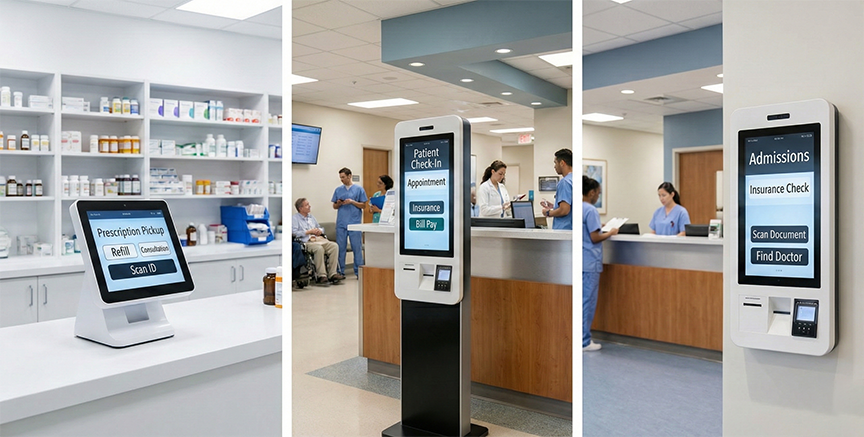
In contrast, financial institutions or private healthcare providers may require kiosks that support more complex transactional flows, including identity verification, document scanning, or sensitive data entry. These environments call for a form factor that provides greater physical stability, privacy screening, and sufficient internal space to house the required peripheral hardware. Identifying the dominant user scenario for your environment helps determine whether a standard self-registration standee or a full-service terminal with integrated peripherals barcode scanner, card reader, printer is the appropriate choice, and prevents over-specification that adds cost without adding operational value.
Evaluate the Transaction Types the Kiosk Must Support

Not all kiosks perform the same functions, and the transaction types your organisation needs to support will significantly narrow down the viable form factors. A slim standee designed for queue ticket issuance operates very differently from a full-height terminal configured for identity verification, document scanning, payment processing, and visitor badge printing. Each additional function typically requires an additional peripheral device, and each peripheral requires physical space within or alongside the kiosk enclosure. Choosing a form factor without first mapping the full transaction scope almost always results in a mismatch between the hardware and the operational requirements it must serve.
Mapping out every transaction the kiosk must handle from basic self-registration to integrated payment via ATT™’s Payment Services Solution is a prerequisite before any hardware is specified. ATT™’s KOS is built around modular peripheral integration, meaning the physical unit can be configured with the exact combination of input and output devices required, without over-specifying hardware that adds cost without adding value. This modular philosophy means that the kiosk is built around the workflow, not the other way around a distinction that has meaningful implications for both the user experience and the total cost of the deployment.
Registration and Check-In Functions
For organisations using ATT™’s Visitor Management System (VMS) or Q’SOFT® EQMS, the kiosk serves as the primary self-check-in touchpoint at the start of the visitor or patient journey. These use cases typically require a touchscreen interface, a QR or barcode reader for appointment confirmation, and a badge or ticket printer to confirm the registration and direct the visitor to the appropriate service area. The transaction itself is relatively straightforward, which means the hardware footprint can remain compact without compromising functionality.
A slim standee or tabletop unit is often sufficient for these functions, keeping the physical footprint minimal while delivering the core workflow with efficiency and clarity. In environments where multiple check-in kiosks are deployed side by side to manage high visitor volumes such as a hospital outpatient department or a government service centre with multiple service lines the compact form factor of a standee also allows for greater spatial flexibility, enabling more units to be deployed within the same floor area without creating congestion.
Payment and Financial Transaction Capabilities
When the kiosk is expected to handle payments whether for service fees, utility bills, or healthcare co-payments the hardware specification increases meaningfully in complexity. Integrated card readers, cash acceptors, receipt printers, and encrypted payment modules are all required, and each of these components demands secure mounting, reliable connectivity, and a physical form factor robust enough to withstand repeated use in a high-footfall environment. The stakes are also higher: a payment kiosk that malfunctions mid-transaction creates a significantly more disruptive service failure than a check-in kiosk that goes offline briefly.
ATT™’s Payment Services Solution integrates directly with the KOS platform, enabling real-time transaction processing and automated reconciliation that eliminates manual handling errors and reduces fraud risk. Full-height or wall-mounted terminals are typically preferred for payment kiosks, providing a stable and secure platform for financial interactions, with sufficient internal space to house the full suite of payment peripherals. The physical permanence of a wall-mounted unit also reinforces user confidence in the security of the transaction environment an important psychological factor in settings where users are submitting card details or making significant payments.
Consider Integration Requirements with Existing Systems
A kiosk that operates in isolation from your broader IT ecosystem creates data silos, manual reconciliation work, and a fragmented service experience for users. Before selecting a form factor, organisations must audit their existing systems queue management platforms, appointment scheduling tools, visitor tracking software, payment gateways, and HR or CRM systems to understand what the kiosk must connect to, and how. This integration audit will inform not only the software configuration of the kiosk but also its physical specification: the form factor must be able to physically accommodate the connectivity infrastructure, whether wired or wireless, and any hardware peripherals required for that integration.
ATT™’s KOS is engineered for seamless integration with the full suite of ATT™ InfoSoft solutions, including Q’SOFT® EQMS, the Online Resource Booking System (ORBS), VMS, and the Payment Services Solution. This interoperability means data flows automatically between touchpoints, eliminating duplicate entry and providing a single, unified view of operations across all service channels. For organisations that already operate one or more of these platforms, selecting the KOS as the kiosk layer creates a cohesive, end-to-end service architecture where every interaction from online appointment booking through to physical check-in and payment is connected, tracked, and reportable from a single operational environment.
API Connectivity and Software Compatibility
The kiosk hardware must support the operating environment and API architecture of the software it runs. Confirming this compatibility during the selection phase rather than discovering incompatibilities post-deployment prevents expensive workarounds and ensures data integrity across all connected platforms from day one. This is particularly important in regulated sectors such as healthcare and government services, where data integrity is not simply an operational concern but a compliance obligation.
ATT™’s KOS platform is built on open integration principles, allowing it to connect with third-party systems as well as ATT™’s proprietary solutions. This flexibility is especially valuable for organisations that operate hybrid IT environments, where legacy systems must coexist with newer digital platforms during a phased modernisation programme. By confirming API compatibility at the hardware selection stage, procurement teams ensure that the physical unit chosen will support the full scope of integration required not just on day one, but as the platform evolves over its operational lifecycle.
Network Infrastructure and Connectivity Demands
High-throughput transaction kiosks require stable, low-latency network connections to ensure that real-time data exchange with backend systems payment gateways, queue management platforms, visitor tracking databases occurs without delay. A slow or intermittent connection at the kiosk level will translate directly into a degraded user experience, increased transaction failure rates, and reduced confidence in the self-service channel as a reliable alternative to manual service. Network infrastructure planning must therefore be treated as an integral part of the kiosk deployment plan, not an afterthought.
In environments where cabling is impractical such as temporary deployment locations, older buildings with limited infrastructure, or outdoor installations secure Wi-Fi or 4G/LTE connectivity options must be evaluated carefully against the transaction volumes and data security requirements of the deployment. ATT™’s KOS supports both wired and wireless configurations, giving deployment teams the flexibility to adapt to the realities of different physical environments. However, the chosen form factor particularly wall-mounted versus freestanding units will influence which connectivity approach is feasible and how cable management is handled within the physical installation.
Peripheral Hardware Integration
Printers, card readers, biometric scanners, and cameras all require physical mounting space within or alongside the kiosk enclosure. The peripheral requirements of a given deployment can vary dramatically depending on the transaction types the kiosk must support, and the physical form factor must be selected with this full peripheral inventory in mind. A unit that looks ideal based on its footprint and aesthetics may prove inadequate when the full suite of required peripherals is added resulting in external attachments that compromise the user experience or create maintenance vulnerabilities.
Full-height terminals offer the greatest internal real estate for peripheral integration, accommodating a wide range of components within a unified enclosure that presents a clean, professional appearance to the user. Tabletop units, while well-suited to lower-complexity transaction flows, may require external peripheral attachments that add to the desktop footprint and create additional points of failure. Reviewing the peripheral requirements against each form factor’s physical specifications early in the procurement process prevents last-minute design compromises that affect both user experience and operational reliability across the deployment lifecycle.
Plan for Scalability, Maintenance, and Long-Term Adaptability
Selecting a kiosk form factor is not a short-term decision. The hardware you deploy today must remain operationally viable as your organisation grows, your service offerings evolve, and technology standards advance. Procurement decisions that focus solely on the immediate requirement without accounting for the three-to-five-year operational horizon frequently result in premature hardware replacement cycles that erode the return on investment and create unnecessary operational disruption. Scalability and adaptability must therefore be evaluated as primary criteria alongside cost, aesthetics, and functional specification.
Modular kiosk designs a hallmark of ATT™’s KOS allow organisations to upgrade individual components such as screens, readers, or software interfaces without replacing the entire unit. This approach reduces total cost of ownership and ensures that the investment continues to deliver value across a multi-year operational lifecycle. Maintenance accessibility is equally important: units deployed in high-footfall environments are subject to wear and require straightforward servicing without prolonged downtime. ATT™’s 24/7 technical support model means that maintenance issues are addressed promptly, keeping kiosks operational and minimising service disruption across all deployment locations.
Modular Upgradability and Hardware Lifecycle Management
ATT™’s KOS is designed with component-level upgradability, meaning that as payment standards, biometric technologies, or display formats evolve, individual modules can be replaced without requiring full unit replacement. This is particularly valuable for organisations operating under tight capital budgets or subject to public sector procurement cycles, as it allows incremental investment aligned to technology refresh timelines rather than necessitating full hardware refreshes every few years. The kiosk infrastructure effectively grows alongside the organisation’s digital maturity, rather than becoming a fixed constraint on it.
Hardware lifecycle management is also a strategic consideration for organisations managing large or geographically dispersed kiosk deployments common across government agency networks, healthcare systems with multiple facilities, and financial institutions with branch networks across different locations. A modular design approach means that component upgrades can be rolled out progressively, reducing the operational and budgetary impact of technology refresh cycles while ensuring that all units across the network maintain a consistent standard of performance and user experience.
Remote Monitoring and Proactive Support
ATT™’s support infrastructure includes remote monitoring capabilities that track kiosk uptime, transaction success rates, and hardware health in real time. This proactive approach identifies potential failures before they cause service disruption, supporting ATT™’s commitment to always-on operational continuity. Rather than waiting for a field report or a user complaint to trigger a maintenance response, the support team can act on system-generated alerts that flag anomalies in device performance significantly reducing the average time to resolution and the operational impact of hardware issues.
For organisations managing multiple kiosk deployments across different locations common in government agencies and healthcare networks centralised remote monitoring significantly reduces the overhead of on-site maintenance visits and ensures that performance data from all units is visible in a single operational view. This visibility supports better resource planning, more informed procurement decisions, and a stronger evidence base for reporting on service availability and system performance to internal stakeholders or regulatory bodies. When combined with ATT™’s modular hardware design, the result is a kiosk ecosystem that is as manageable as it is scalable.
Choosing with Confidence: The ATT™ KOS Advantage
Selecting the right kiosk form factor comes down to a clear-eyed assessment of five interconnected dimensions: your physical space, your user demographics, the transactions the kiosk must support, your integration landscape, and your long-term operational goals. None of these dimensions can be evaluated in isolation a choice that optimises for one without accounting for the others will invariably create friction somewhere in the service journey. The organisations that get this decision right are those that treat kiosk selection as a strategic exercise, not a procurement formality.
ATT™’s Kiosk Operation Solution provides a configurable, integration-ready platform that adapts to each of these dimensions backed by expert consultation, modular hardware design, and round-the-clock support that ensures your deployment continues to perform long after go-live. Whether you are deploying a single tabletop unit in a clinic waiting room or a network of full-height terminals across a government service infrastructure, the right form factor exists within the KOS range. If you are evaluating kiosk deployment for your organisation, speak with the ATT™ InfoSoft team today at infosoft-sales@attsystemsgroup.com to identify the form factor and configuration that fits your exact environment.
Contact ATT at infosoft-sales@attsystemsgroup.com for details.
Frequently Asked Questions
Q: What’s the difference between a full-height kiosk terminal and a slim standee, and how do I know which one my business needs?
A: Full-height terminals are better suited for complex transactions like payments or identity verification that require multiple peripherals, while slim standees work well for simpler check-in or queue ticketing workflows with a smaller footprint. Your transaction scope and available floor space are the two fastest ways to narrow down which format is appropriate.
Q: Can a self-service kiosk be deployed outdoors, and what hardware differences should I expect compared to an indoor unit?
A: Outdoor kiosks require ruggedised enclosures, anti-glare displays, and weatherproofing to handle humidity, rain, and temperature extremes that would degrade standard commercial-grade hardware. ATT™’s KOS configurations address both indoor and outdoor environments, matching hardware specifications to the operating conditions from the start.
Q: How do I make sure a kiosk is accessible for elderly users or people with disabilities without deploying separate devices?
A: Features like tilting screen mechanisms, high-contrast display modes, audio assistance, and wheelchair-appropriate screen heights can be built into a single unit rather than requiring separate hardware. ATT™’s KOS supports accessibility configuration as part of its modular design, so all users can engage with the same kiosk independently.
Q: What happens to my kiosk investment if my transaction requirements change or new payment standards emerge in a few years?
A: Choosing a modular kiosk design means individual components like screens, card readers, or software interfaces can be upgraded without replacing the entire unit. ATT™’s KOS is built for component-level upgradability, which reduces total cost of ownership across a multi-year operational lifecycle.
Q: How should kiosk placement be decided relative to existing queues and service counters to avoid creating new bottlenecks?
A: Kiosks should guide users naturally toward self-service at the right moment in their journey, before they join a manual queue, using pedestrian flow data rather than assumptions to identify optimal placement zones. Analytics from ATT™’s Q’SOFT® EQMS can provide that real operational data to inform positioning decisions.
Q: If my organisation already uses a queue management or visitor management system, will a new kiosk integrate with it or create a separate data silo?
A: A kiosk operating in isolation from your existing platforms creates duplicate entry, fragmented reporting, and a disjointed user experience, so API compatibility must be confirmed before hardware is selected. ATT™’s KOS integrates natively with Q’SOFT® EQMS, VMS, ORBS, and the Payment Services Solution, creating a unified data flow across every service touchpoint.
Q: Is a tabletop kiosk unit sufficient for a high-volume environment like a hospital outpatient department, or will it get overlooked?
A: Tabletop units can work in contained spaces but risk going unnoticed in high-footfall environments where visibility and throughput speed are critical. In high-volume settings, a slim standee or full-height terminal positioned at a natural entry point typically delivers better user engagement and faster transaction completion rates.
Contact ATT at infosoft-sales@attsystemsgroup.com for details.
Send us a message
Contact Information
Address:
35 Ubi Crescent, ATT Building, Singapore, 408585
Phone:
Email:
Website:
www.attsystemsgroup.com